



An adjustable headrest is useful only when it meets you in the right place. During focused desk work, you may barely use it. When you lean back to read, take a call or pause between tasks, it can become much more noticeable.
The key is not simply whether a chair has a headrest, but whether its height, angle and contact position work with the way you actually sit.

Adjustable Office Chair Headrests: A Quick Overview
| What to check | Why it matters |
|---|---|
| Height range | Determines where the headrest actually meets you |
| Angle adjustment | Changes how the pad contacts your head |
| Upright position | Should not push your head forward while working |
| Reclined position | Should remain comfortable when you lean back |
| Whole-chair fit | Seat depth and backrest position affect headrest contact |
Do You Need an Office Chair Headrest?
An office chair headrest can be useful during everyday work, not just when you lean back. When properly positioned, it can provide comfortable head support while you work at your desk, read or take calls.
The right fit depends on your sitting posture and the chair's overall design. Some people prefer light contact while working upright, while others use the headrest more when reclining. Neither approach is wrong. What matters is whether it supports your natural sitting position without pushing your head forward or forcing your neck into an awkward angle.
If you spend long hours at your desk, consider how the headrest works alongside the backrest, lumbar support and seat depth. A well-matched chair should feel comfortable as a complete seating system, rather than relying on the headrest alone.
Check Headrest Height and Angle Adjustment
An office chair with an adjustable headrest should clearly explain what moves and how you operate it. “Adjustable” alone does not describe the range or the mechanism.
Compare height and angle separately
Height adjustment moves the support up or down. Angle adjustment rotates the contact surface, changing how it meets your head.

Changes the orientation of the contact surface. Check how the pad meets your head.

Moves the support up or down. Check the contact position at different settings.
ATLAS-01 · Adjustment reference
Neither movement automatically provides forward-and-back adjustment. If that movement matters to you, ask whether the specific model offers it.
For a mesh office chair with a headrest, inspect the supporting frame as well as the mesh panel. Check whether you can find a comfortable contact position without resting against an unwanted edge.
Do not assume a larger adjustment number means a better fit. First see where the headrest sits at its lowest and highest positions. Then look at the angle adjustment separately—the two movements solve different fit problems.
Compare contact height, not only adjustment travel

Headrest travel is one of the easiest specifications to misread. Two headrests can offer similar travel but start at different heights. The chair's backrest and mounting position affect where the adjustment range sits.
Ask for the lowest and highest headrest contact positions relative to the seat. A travel figure alone cannot establish whether the support reaches you.
If detailed dimensions are available, you can compare the headrest's lowest and highest positions against a chair that already fits you well. Treat this as a reference rather than a guarantee, because backrest shape and seated proportions still matter.
Treat this as a comparison aid, because pad shape, forward reach and cushion compression still affect contact. People of similar standing height can have different seated proportions.
Check the adjustment method

Some headrests use buttons or knobs, while others move through a ratchet mechanism. Find out how you raise, lower and reset the model you are considering.
ATLAS and ATLAS-01 use a ratcheting height mechanism and a rotating headrest for angle adjustment. Follow the model instructions, especially when resetting the height range.
Check the Fit When Upright and Reclined
A headrest that feels comfortable during a brief lean-back may behave differently when you return to your keyboard. Check both positions before deciding.

Check headrest position alongside your usual desk setup and working habits.

Recheck contact after selecting the recline setting you expect to use.
Posture reference
During typing and mouse work
Set the seat and back support first, then return to your normal desk position. Look ahead comfortably and notice whether the headrest changes the position you would otherwise choose.
OSHA's workstation evaluation checklist says an adjustable headrest should not push the head forward past neutral. Use that as a practical check, rather than trying to maintain contact at every moment.
Test a paragraph of typing and some mouse work. Check whether your arms remain comfortable and whether you can reach your tools without moving away from the backrest.
During reading, calls and reclined pauses
A reclining office chair with a headrest should let you compare contact at the positions you actually use. Follow the chair's instructions to select a supported recline setting.
Then check whether the pad still meets you comfortably. Notice any pressure from the frame or any need to lift your chin to stay against the support.
Return upright and repeat the desk check. You may prefer different headrest settings for focused work and a reclined pause.
If the headrest pushes your head forward
Change one setting at a time so you can understand its effect:
- Recheck seat depth and make sure you can use the backrest comfortably.
- Confirm that the lumbar support meets your lower back without displacing your sitting position.
- Adjust headrest height, then its angle, using the model's instructions.
- Return to your keyboard and compare your natural head position.
- If comfortable contact remains unavailable, consider a different headrest shape or chair configuration.
Avoid adding improvised padding to solve a fit problem before checking the basic settings. Extra material changes the contact position and can make comparison harder.
For office chairs with adjustable lumbar support, check that support alongside the seat and headrest. A headrest cannot make an unsuitable seat depth work.
Check your screen before readjusting the headrest again
Before blaming the headrest, look at the screen. A screen that encourages reaching or chin lifting can make a suitable chair feel awkward. Check viewing distance, text size and screen height alongside the headrest.
OSHA's monitor guidance explains how viewing distance and screen height can change head position. It also notes that bifocal users may need a lower screen to avoid tipping their heads backward.
Try the setup wearing the glasses you normally use for work. Adjust the screen for clear viewing, then reassess headrest contact. Do not use the headrest to hold a position you need only to read the display.
Is the Headrest Included or Sold Separately?
Not every office chair includes a headrest as standard. Some models offer it as an optional accessory, while others are designed without a headrest.
If you are considering an aftermarket office chair headrest, do not assume it will fit just because the attachment looks similar. Check the chair's mounting points, connection method and compatibility requirements before buying.
Also confirm whether installing a third-party headrest could affect the manufacturer's warranty or product support. When possible, choose an accessory specifically approved for your chair model.
Compare COLAMY ATLAS and ATLAS-01
Both models include an adjustable headrest in their standard configuration. Their assembly instructions list the headrest and show how to install it.
These ergonomic office chairs with headrests pair mesh backs with foam seat cushions. Our ergonomic chairs collection brings these adjustable designs together.
| Feature | COLAMY ATLAS | COLAMY ATLAS-01 |
|---|---|---|
| Headrest included | Yes | Yes |
| Height-adjustment travel | Approximately 3 in. / 7.5 cm | Approximately 2.8 in. / 7 cm |
| Listed headrest rotation | 30° | 30° |
| Height mechanism | Ratcheting adjustment | Ratcheting adjustment |
| Back and seat | Mesh back and foam cushion | Mesh back and foam cushion |
| Other adjustments | Lumbar support, seat depth and 4D armrests | Lumbar support, seat depth and 4D armrests |
| Backrest locking positions | Four | Four |
| Base | Aluminum alloy | Reinforced nylon |
The listed travel describes headrest movement, not its complete height above the seat. Compare actual contact and whole-chair dimensions before treating either model as a match for your body.
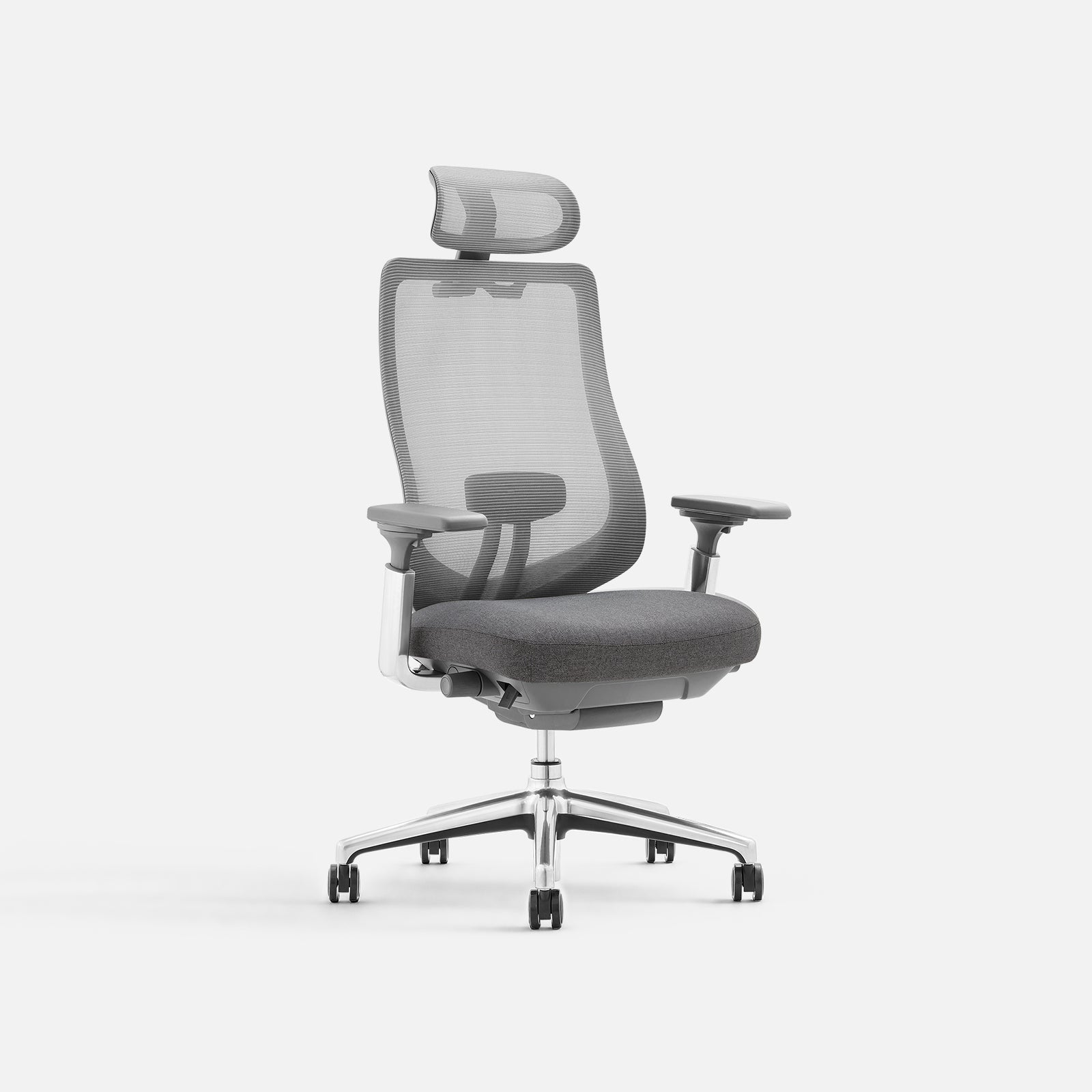
Adjustable headrest included
COLAMY ATLAS
Mesh back, cushioned seat and an aluminum alloy base.
- Height- and angle-adjustable headrest
- Adjustable lumbar support and seat depth
- 4D armrests and four recline locking positions

Adjustable headrest included
COLAMY ATLAS-01
Mesh back, cushioned seat and a reinforced nylon base.
- Height- and angle-adjustable headrest
- Adjustable lumbar support and seat depth
- 4D armrests and four recline locking positions
Which differences should guide your choice?
The headrest adjustment range is not a major deciding factor between these two chairs. ATLAS offers 3 inches of height travel, compared with 2.8 inches on ATLAS-01. That 0.2-inch difference is unlikely to matter as much as how the headrest, backrest and seat fit your body.
Instead, look at the overall chair design. Both models offer adjustable lumbar support, 4D armrests and sliding seat depth. The clearest listed difference is the base: ATLAS has an aluminum alloy base, while ATLAS-01 uses reinforced nylon.
If you prefer an aluminum base, ATLAS is the more suitable choice. If you prefer reinforced nylon, consider ATLAS-01. Either way, compare the seat depth, backrest fit and headrest contact position before making your final decision.
Prioritize useful adjustments within your budget
Start with seat height, depth and back support. Treat the headrest as part of the whole chair rather than the feature that decides everything.
Final Thoughts
A good headrest should fit around the way you already work, not ask you to change your posture just to use it. If you spend most of the day typing, prioritize the seat and backrest first. If you regularly lean back, the headrest deserves much closer attention.
At COLAMY, we believe useful adjustments should make everyday home working feel simpler, not more complicated.
Find Support That Suits Your Workday
Compare headrest designs, seat dimensions and practical adjustments across our collection.
Adjustable Headrest Office Chair FAQs
What are the best office chairs with adjustable headrests?
The best office chair with an adjustable headrest is one that fits your body and supports your preferred sitting position without pushing your head forward. Look for adjustable headrest height and angle, along with suitable seat depth, lumbar support and armrests. Within COLAMY's range, the ATLAS and ATLAS-01 offer both height and angle adjustment, making them worth comparing if you want customizable head support for everyday work.
Should my head touch the headrest while typing?
Not necessarily. You should not need to push your head backward or accept forward pressure to maintain contact. Check your natural desk posture and adjust the headrest for the tasks where you want support.
Can I choose a headrest using my standing height?
Standing height is only an initial reference. Seated proportions, backrest height, cushion compression and the headrest's mounting position affect fit. Check the lowest and highest contact positions as well as adjustment travel.
Do ATLAS and ATLAS-01 include their headrests?
Yes. Both standard configurations include a headrest, and their assembly instructions list it among the supplied parts. Follow the instructions for your model when installing and adjusting it.
Can I add any headrest to an existing office chair?
No. Confirm the exact chair version, mounting method, required hardware and supplier-approved compatibility. Check support terms before making changes or fitting a third-party accessory.


