



Office chairs with adjustable seat depth let you change how much of your thighs the seat supports. The right setting should leave room behind your knees while keeping your back comfortably against the backrest. What matters most is the usable depth range, not simply how far the seat slides.

Adjustable Seat Depth: A Quick Overview
| What to look at | Why it matters |
|---|---|
| Minimum seat depth | Helps you find a comfortable position without crowding your knees |
| Maximum seat depth | Determines how much thigh support the seat can provide |
| Adjustment travel | Shows how far the seat moves, not its actual depth range |
| Knee clearance | Helps you avoid pressure behind your knees |
| Control operation | Shows how easily you can change and secure the setting |
| Whole-workstation fit | Helps you check back support, foot position and desk access together |
What Is Adjustable Seat Depth?
Adjustable seat depth changes the distance between the back support and the front edge of the usable seat. Many chairs achieve this through a seat pan that moves forward and backward.

Moving the seat forward usually increases usable depth. Moving it backward usually creates a shallower sitting area.
A seat slider changes how much of the cushion sits in front of your back support. Seat height adjustment works differently: it raises or lowers the entire sitting surface. You may need both adjustments to find a comfortable position, especially if your desk height limits how low you can set the chair.
Measure usable depth, not overall chair depth
Overall chair depth may include the backrest, frame or other projecting parts. It does not tell you how much sitting space lies in front of the back support.
Ask where the seat-depth measurement starts and ends. A cushion measured from its rear seam may differ from the usable space in front of the lumbar support.
Compare diagrams using matching reference points and similar backrest settings. Otherwise, two apparently identical depth figures may describe different sitting spaces.
How to Check Whether Your Seat Is Too Deep or Too Shallow
Start with your feet supported and your back comfortably against the backrest. Then notice where the front edge meets your thighs.
The Canadian Centre for Occupational Health and Safety recommends back support, thigh support and freedom from pressure behind the knees. Use those checks together when assessing office chair seat depth.
Signs the seat may be too deep
A seat may be too deep if you notice either of these patterns:
- The front edge presses behind your knees when you sit back.
- You slide forward to make room for your legs, losing backrest contact.
First recheck seat height, because unsupported feet can also change how the front edge feels. Then shorten the depth and compare the result.
If you have shorter legs, pay close attention to the chair's minimum usable seat depth. You should be able to sit against the backrest without the front edge pressing behind your knees. Seat height and width still matter, so judge all three measurements together.
Signs the seat may be too shallow
A shallow seat may leave more of your thighs unsupported than you prefer. You may want more support beneath your thighs, even when your back and feet are comfortably supported.
Try extending the seat slightly while keeping your back supported. Stop before the front edge crowds your knees.
An office chair for taller users may need greater usable depth, but torso and leg proportions still matter. Compare your seated fit instead of assuming that every tall person needs the longest setting.
What Comfortable Knee Clearance Looks Like

Leave a comfortable gap between the seat edge and the backs of your knees. Your thighs should still feel supported, and you should not need to slide forward to avoid pressure. Treat the space as a fit check rather than a fixed measurement.
What to Compare Before Buying
A seat-depth adjustable office chair needs more than a stated sliding distance. Ask for both endpoints of the usable depth range.
Adjustment travel does not reveal the starting depth
Imagine one chair adjusts from 16–18 in / 40.6–45.7 cm and another from 18–20 in / 45.7–50.8 cm. Both offer 2 in / 5.1 cm of travel, but their minimum depths differ.
Before comparing chairs, look for three measurements: minimum usable seat depth, maximum usable seat depth and total adjustment travel. Also check where the manufacturer starts and ends the measurement. A cushion measurement from the rear edge may not represent the usable space in front of the backrest.
Use your current chair as a comparison tool
If your current chair fits reasonably well, measure its usable depth and note the reference points. Then record what you would change: less knee contact, more thigh support or easier backrest contact.
If it fits poorly, its dimensions still help describe the problem. They should not become your automatic target for the next purchase.
Choose an ergonomic office chair with adjustable seat depth whose range includes a setting that suits your legs and back support.
Account for an added back cushion
A separate lumbar or back cushion takes up space behind you, reducing the usable seat depth without changing the seat pan itself. If you plan to use one, adjust the chair with the cushion in place. Then check knee clearance and thigh support again.
How to Adjust the Seat Depth
Read your model's instructions before operating the mechanism. Some chairs use levers, while others use knobs or buttons.
On ATLAS and ATLAS-01, the seat-depth control sits on the left side when you are seated. Pull the knob outward to unlock adjustment, and push it inward to lock the setting.


Follow a Simple Adjustment Sequence
-
Set the chair height so your feet rest firmly on the floor or a footrest.
-
Sit back against the backrest and locate the seat-depth control.
-
Unlock the slider and move the seat gradually until your thighs feel supported.
-
Leave comfortable space behind your knees, then lock the seat in place.
-
Return to your desk and check your back support, foot position and keyboard reach.
Keep your fingers clear of moving parts. Never force the slider beyond its adjustment limits. If the seat will not lock securely, stop and check the manufacturer's instructions.
Check the Fit at Your Desk

A seat position may feel comfortable on its own but change how you sit once you return to work. Spend a few minutes typing and using your mouse. Notice whether you can stay against the backrest, reach your desk comfortably and keep your feet supported.
The CCOHS chair-adjustment guide connects chair setup with the desk and floor. It recommends a footrest when raising the chair for desk access leaves your feet unsupported.
For office chairs with adjustable lumbar support, reassess lumbar contact after changing seat depth. Moving the cushion changes where you sit relative to the backrest.
Make Sure the Armrests Clear Your Desk
If you keep sliding forward while typing, check whether the armrests prevent the chair from moving close enough to your desk. Raise, lower or reposition them if your model allows. You may find that improving desk access solves the problem without changing the seat depth again.
Two COLAMY Chairs with Adjustable Seat Depth
Both chairs combine a sliding seat with a mesh back and a foam cushion. Their controls let you adjust depth separately from seat height.
Our ergonomic chairs collection includes adjustable designs for comparing these features alongside back and arm support.
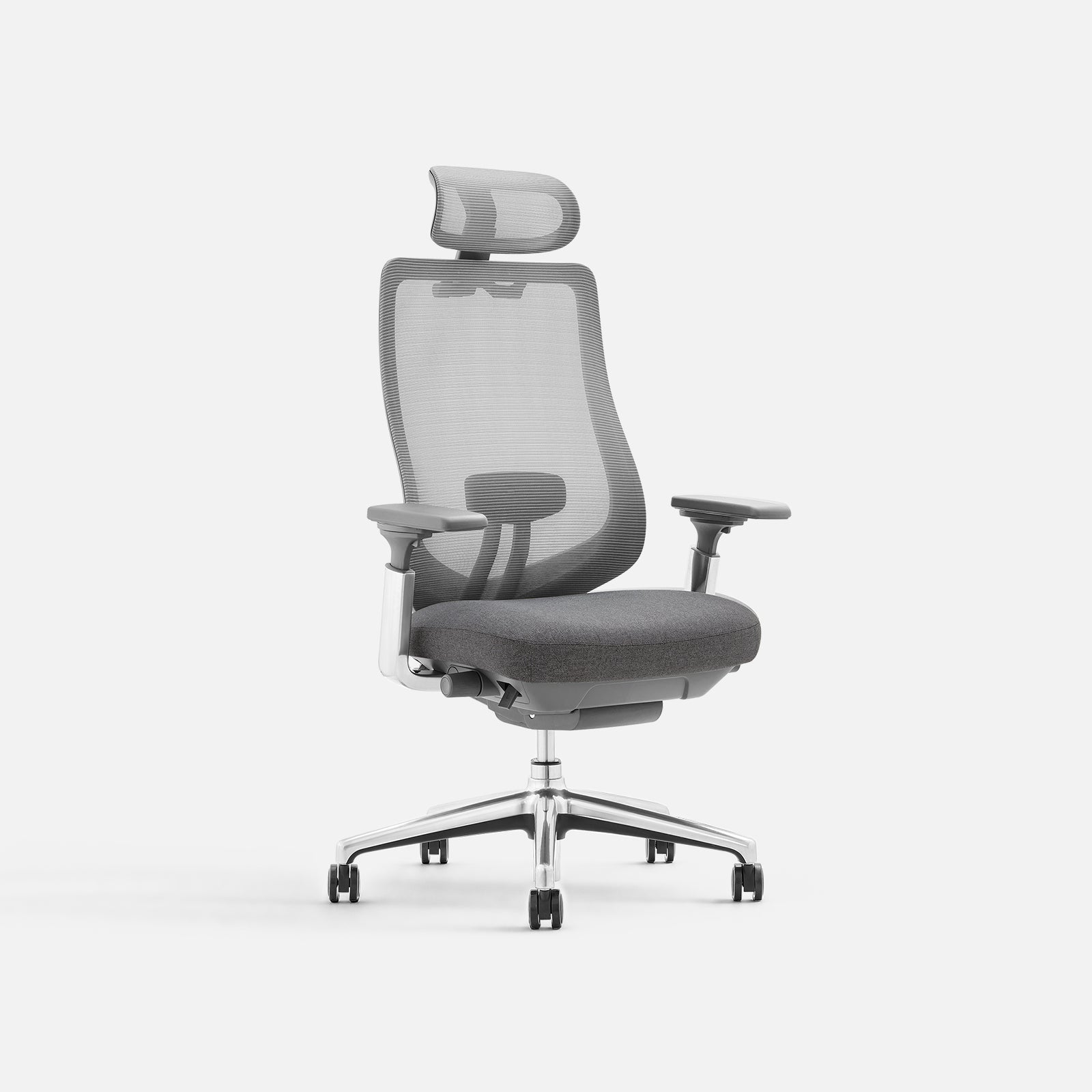
COLAMY ATLAS
Mesh back, cushioned seat and an aluminum alloy base.
- Seat-depth adjustment: approximately 2 in / 5 cm
- Adjustable lumbar support and headrest
- 4D armrests and four recline locking positions

COLAMY ATLAS-01
Mesh back, cushioned seat and a reinforced nylon base.
- Seat-depth adjustment: approximately 2 in / 5 cm
- Adjustable lumbar support and headrest
- 4D armrests and four recline locking positions
Both models offer approximately 2 in / 5 cm of seat-depth adjustment. If this feature suits your setup, compare their base materials, colors, other adjustment ranges and current prices to choose the complete chair you prefer.
When choosing a mesh office chair for long hours, test the depth setting during the tasks you repeat most often.
Final Thoughts
Choose a seat-depth range that lets you use the backrest, support your thighs and leave comfortable space behind your knees. Then check the setting at your desk during everyday tasks.
At COLAMY, we believe useful adjustments should help furniture fit the way you work at home.
Find a Chair That Fits Your Workday
Compare seat dimensions and practical adjustments across our collection.
Adjustable Seat Depth FAQs
What does adjustable seat depth mean on an office chair?
It means you can change the usable front-to-back sitting space. Many models use a sliding seat pan, while other designs change the backrest position.
Is a two-inch seat slider enough?
It depends on the starting depth and your seated proportions. Compare minimum and maximum depth, because identical travel can cover different sitting ranges.
Should I choose the shortest seat-depth setting?
Only if it provides suitable thigh support and comfortable knee clearance while you use the backrest. The shortest setting does not automatically fit every shorter user.
How do I adjust seat depth on COLAMY ATLAS and ATLAS-01?
Both ATLAS and ATLAS-01 use a seat-depth knob on the left side when seated. Pull it outward to unlock the seat, slide to your preferred position, then push it inward to lock. Check that the seat stays in place before using the chair.
What if the seat still presses behind my knees at its shortest setting?
First check seat height and foot support. If the edge still presses behind your knees while your back is supported, look for a chair with a shallower usable seat depth.


